Whether you manage multiple client accounts or you’re a creative trying to stay visible without burnout, having a structured approach to social media scheduling can completely change your results.
Creative content writer with a knack for storytelling that connects. Wielder of wit, turning “meh” into magic daily.

Social media success rarely happens by accident. Behind every “effortless” brand feed is a clear system, thoughtful planning, consistent scheduling, and a solid content calendar. Whether you manage multiple client accounts or you’re a creative trying to stay visible without burnout, having a structured approach to social media scheduling can completely change your results.
In this guide, we’ll break down why scheduling matters, the best social media scheduling tools, and a simple, reusable content calendar template you can adapt for any brand or platform.
Posting randomly might feel spontaneous, but it often leads to inconsistency, missed opportunities, and content fatigue. Scheduling your content in advance gives you:
For businesses and creatives alike, scheduling shifts social media from a daily stressor to a strategic asset.
A content calendar is the backbone of any effective social media strategy. It’s not just a posting timetable, it’s a visual roadmap that shows:
Without a content calendar, brands often over-post promotional content or underutilize storytelling, trends, and audience interaction.

Here are some reliable tools social media managers and creatives swear by:
1. Meta Business Suite
Perfect for Facebook and Instagram scheduling. It’s free, reliable, and ideal for brands focused on Meta platforms.
2. Buffer
Simple, clean, and beginner-friendly. Buffer allows scheduling across multiple platforms with easy analytics.
3. Hootsuite
A powerful tool for enterprise-level scheduling, monitoring, and team collaboration.
4. Later
Excellent for visual planning, especially for Instagram and TikTok.
5. Sprout Social
Advanced analytics, reporting, and CRM features make this a premium choice.
The best tool isn’t always the most expensive — it’s the one that fits your workflow and client needs.
A functional content calendar should include these key elements:
1. Platform
Instagram, TikTok, LinkedIn, Facebook, X (Twitter), Pinterest, etc.
2. Content Type
3. Content Pillar
Examples include:
4. Caption & CTA
This ensures messaging aligns with goals, whether it’s saving, sharing, clicking, or buying.
5. Posting Date & Time
Based on audience insights and platform analytics.

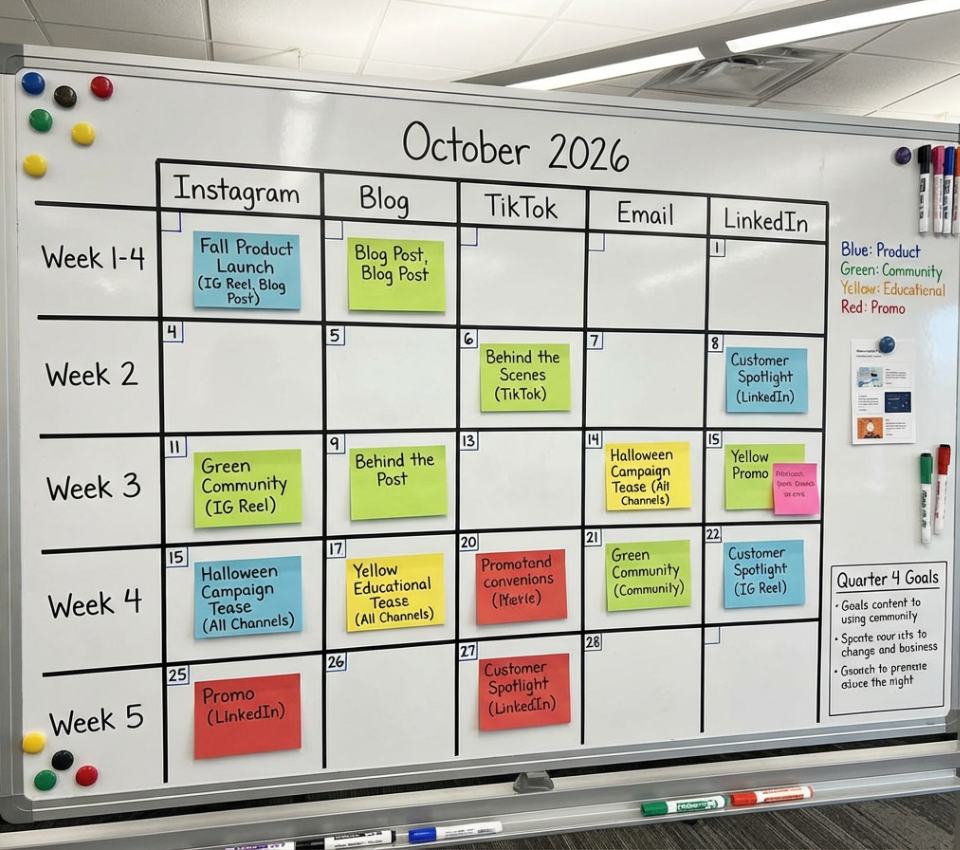
Here’s a flexible content calendar structure you can recreate in Google Sheets, Notion, or Excel:
Weekly Breakdown Example:
Template Columns:
This format keeps planning simple while leaving room for creativity and trends.
For social media managers, a structured scheduling system improves productivity and client results. For creatives, it removes guesswork and creative fatigue. And for brands, it ensures consistent visibility and growth.
At Branderah, we believe great social media isn’t about posting more; it’s about posting with purpose, structure, and strategy. Let Branderah help.
Reach out today — we’d love to hear from you! Let’s bring your vision to life.